
Airbrush: Face & Photo Editor
PIXOCIAL TECHNOLOGY (SINGAPORE) PTE. LTD.Photography
4.130.51K Reviews
- Version
- 8.20.0
- Installs
- 100.00M
- Age Rating
- Teen
Screenshots

Our Review of Airbrush: Face & Photo Editor
 Analysis by Appyee
I reach for Airbrush: Face & Photo Editor when I want to polish a portrait without turning a quick photo into a long editing session. It is a photography app from PIXOCIAL TECHNOLOGY (SINGAPORE) PTE. LTD., and its focus is clear: small, targeted changes to faces and photos, with enough creative tools to make an image feel more finished. I find it most useful when I have a specific result in mind, such as a natural-looking profile picture or a brighter group photo, rather than when I want to build a complex design from scratch.
A good fit for quick portrait work
The app is free to download, with optional in-app purchases ranging from $0.49 to $89.99 per item. Its 4.0 average from around 1.6 million ratings and more than 50 million installs suggest that it has found a broad audience, though popularity alone cannot tell you whether its retouching style will suit you. The age rating is Everyone 10+, and version 8.2.0 runs on Android 8.0 or later.
For me, the best starting point is a photo that is already close to what I want. Airbrush can help refine a face or adjust the mood, but it is not a substitute for good light, a clean lens, or careful framing. If a selfie is badly underexposed or a face is hidden in shadow, heavy edits can make it look less natural instead of rescuing it. I would take another photo when possible, then use the app for finishing touches.
Get Ready to Transform Your Photos
First things first, let’s talk about the user interface. When you open the app, it's like stepping into a digital artist’s studio. Everything is laid out super intuitively, so even if you’re not tech-savvy, you’ll get the hang of it in no time. The app offers a bunch of features, but don’t worry, it doesn’t feel overwhelming.
Editing Made Easy
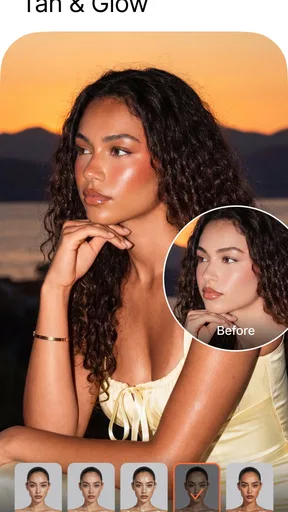
One of the coolest things about this app is its one-touch editing. Seriously, just one tap and your photo can go from drab to fab. The magic wand tool automatically enhances your picture, adjusting brightness, contrast, and saturation to make your image pop.
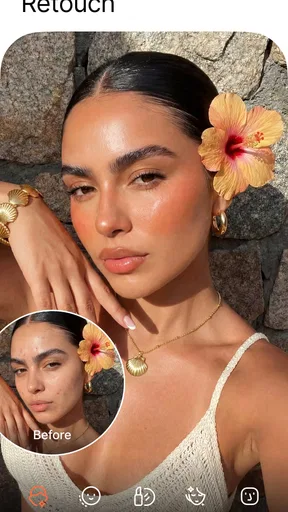
Now, if you’re like me and enjoy a little more control, you’ll love the manual editing options. You can tweak everything from the tiniest blemish to the overall tone of your photo. The Blemish Remover is particularly satisfying for those unexpected skin surprises. Plus, the app’s Whiten Teeth feature is a lifesaver—goodbye, coffee stains!
Making careful adjustments
My practical tip is to use automatic enhancement as a starting point, not a verdict. A quick preview can make a photo look punchier, but skin tones and bright areas may need a lighter touch. I zoom in for small blemish edits, then check the image again at normal size; details that seem invisible close up can become conspicuous when viewed as a whole. For teeth whitening, subtlety matters too. A little adjustment can lift a smile, while pushing it too far can make teeth look detached from the rest of the portrait.
For a group selfie, I would edit the overall image first and then make only the individual touch-ups that actually help. Retouching every face by the same amount can flatten the differences that make people look like themselves. This is one of the app’s useful trade-offs: the controls make quick changes accessible, but a believable result still depends on restraint and checking the complete frame.
Filters and Effects
Let’s not forget about the filters. Airbrush has a wide variety of them, each giving your photos a unique vibe. Whether you’re going for a vintage look or a vibrant modern aesthetic, there’s something for everyone. Plus, you can stack filters to create your own signature style.
And if you’re into adding a bit of drama, the blur tool works wonders by focusing on your subject and artistically blurring the background. It’s like having a professional camera right in your pocket!
Keeping a consistent look
When I am editing several photos for the same post, I try to settle on the mood before changing individual details. A filter can tie a small set of images together, but stacking effects can also shift color and contrast enough to make one photo feel unlike the others. I compare each finished edit with the unedited original and with the other images in the set. That quick side-by-side check is a better guide than judging each photo in isolation.
Blur is most convincing when the subject and background are easy to distinguish, such as a person standing apart from a plain wall. Busy edges, loose hair, or objects close to the subject can make an artificial-looking boundary more noticeable. I would use the effect lightly on a casual portrait, and skip it when the scene itself is the point of the picture. For a landscape or a carefully composed travel photo, a general-purpose photo editor may offer a better fit than a portrait-first workflow.
Going Beyond the Basics
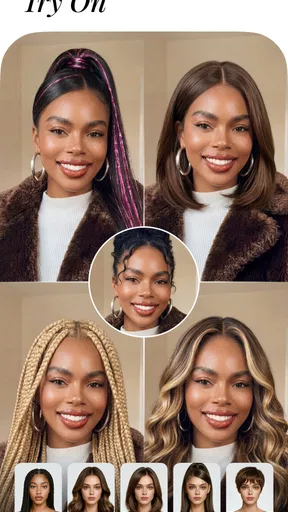
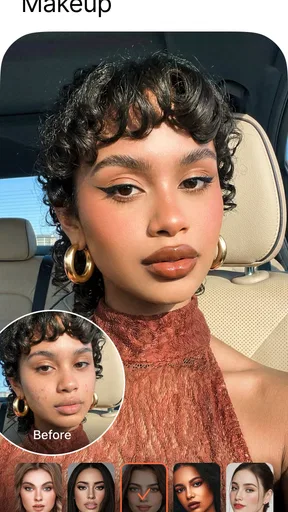
What sets Airbrush apart from other editing apps is its focus on beauty retouching. The app offers features such as Slimming and Lengthening tools, which can subtly adjust proportions to enhance your natural features. There's also a Makeup section, where you can try different looks without the commitment—perfect for experimenting with bold lip colors or funky eyeshadows.
And for those days when you’re feeling extra creative, the app’s Backgrounds feature lets you swap out your entire background to transport your selfies to new and exciting places.
Using the stronger tools thoughtfully
Body reshaping and background replacement can make a striking difference, so they are also the features where small edits matter most. I would make one change at a time and inspect the nearby edges: a straight doorframe, tiled wall, or other familiar line can reveal when proportions have been pushed too far. If the photo is for a professional profile or a work page, I would keep reshaping and makeup effects restrained. A polished image should still look like the person someone will meet.
Background replacement is a better choice when the original setting is distracting and the subject is clearly separated from it. If hair blends into the background or the lighting in the new scene feels very different, the result may call attention to the edit. In that situation, cropping or choosing another photo can look more convincing. These tools are fun for playful portraits, but they are not always the right answer for documentary, product, or editorial photography where the original scene matters.
Who will enjoy the workflow
I would recommend Airbrush to someone who regularly takes selfies, wants quick portrait touch-ups, or likes experimenting with makeup and appearance changes before sharing a photo. It can also suit a small creator preparing a casual post, especially when the job is to refine one image rather than assemble a whole campaign. Someone who wants detailed control over layers, typography, color grading, or multi-image projects will probably be happier in a broader photo or design editor.
Compared with a basic phone gallery editor, Airbrush puts more emphasis on face and body retouching, so the relevant controls are easier to find when that is the task. Compared with a general-purpose editor, that focus is also a limit: it is not the tool I would choose first for compositing several images, building a poster, or carefully correcting a landscape. The right alternative depends on the job. For a quick portrait, a focused retouching app can save time; for a complete visual project, a more flexible editor is usually better.
Sharing Made Simple
Once you’ve perfected your masterpiece, sharing it with the world is a breeze. Airbrush seamlessly integrates with social media platforms, so you can post directly to Instagram, Facebook, or wherever your audience is waiting to be wowed.
Plus, if you’re not ready to share just yet, the app saves your edits in high resolution, ensuring they’re ready to go whenever you are.
From edit to post
For a realistic everyday workflow, imagine taking a quick selfie before meeting friends, then noticing that the overhead light has made the picture look dull. I would try the automatic adjustment, reduce any effect that makes my skin or teeth look unnatural, and decide whether a filter suits the setting. Before posting, I would inspect the image at the size it will appear on a phone screen. That final check catches edits that looked fine while zoomed in but feel too strong in the finished composition.
If you are preparing an image for a specific platform, keep an untouched copy so you can make a different crop or treatment later. The app’s sharing and saving options make it convenient to move from editing toward publication, but I would still review the saved result before relying on it for a more formal use. If your priority is a precise crop, typography, or a branded layout, finish that work in a tool built for those tasks rather than expecting a portrait editor to handle every part of delivery.
What to expect before you commit
Airbrush is free to try, but some purchases are available inside the app. If you are unsure whether its approach suits you, I would start with a photo you do not need to publish and test the controls that matter most: a small blemish correction, a mild tone adjustment, and one filter. That gives you a sense of how much control you have before spending time on a batch of images or considering an optional purchase.
The app is also not my first pick when authenticity is more important than polish, when a face occupies only a small part of the frame, or when I need precise, repeatable edits across a large set of photos. In those cases, a general photo editor—or simply retaking the picture—can produce a more dependable result. Airbrush is most satisfying when the goal is personal, quick, and portrait-led.
Final Thoughts
In a nutshell, Airbrush: Face & Photo Editor is a fantastic tool for anyone looking to enhance their photos quickly and easily. It’s packed with features that cater to both casual users and those who like to delve into detailed edits.
Whether you’re touching up a selfie or transforming a landscape shot, this app gives you the power to create stunning images with just a few taps. So go ahead, unleash your inner artist, and watch your photos come to life!
My verdict is that Airbrush earns its place as a handy portrait tool, not an all-purpose replacement for every editing app. I like that it can take a photo from “almost ready” to shareable without requiring a complicated process, and I appreciate having quick fixes alongside more expressive choices. The catch is that its strongest retouching tools can change the character of a picture quickly, so I would keep checking the original and ease off whenever an edit starts to look like an effect rather than a photo.
If your usual edits involve selfies, friendly group shots, or trying a new makeup look, it is worth exploring. If you prefer untouched portraits, need detailed design controls, or mainly edit scenery, you may get more from a different kind of editor. I would keep it for the moments when a focused, fast portrait finish is exactly what I need.
Privacy and Permissions
See what permissions an app requests and how it handles your data.
- Device & app history
- retrieve running apps
- Photos/Media/Files
- read the contents of your USB storage, modify or delete the contents of your USB storage
- Storage
- read the contents of your USB storage, modify or delete the contents of your USB storage
- Camera
- take pictures and videos
- Wi-Fi connection information
- view Wi-Fi connections
- Other
- view network connections, create accounts and set passwords, change network connectivity, measure app storage space, full network access, change your audio settings, run at startup, control vibration, prevent device from sleeping, Google Play license check
Verdict
Strengths of Airbrush: Face & Photo Editor
- Intuitive user interface for easy editing.
- Wide range of editing tools available.
- Real-time editing with instant previews.
- Frequent updates with new features.
- High-quality output without watermark.
Limitations of Airbrush: Face & Photo Editor
- Some features require a paid subscription.
- Occasional ads can interrupt workflow.
- Limited free filters and effects.
- High-resolution exports may slow down.
- May drain battery with extended use.
Other Releases by PIXOCIAL TECHNOLOGY (SINGAPORE) PTE. LTD.
View All
BeautyPlus-Selfie Photo Editor
Photography4.5
Similar Picks in This Category
View All
Google Photos
Google LLC4.4

Gallery
Google LLC4.2

Picsart AI Photo Editor, Video
PicsArt, Inc.3.9

B612 AI Photo&Video Editor
SNOW Corporation4.1
BeautyPlus-Selfie Photo Editor
PIXOCIAL TECHNOLOGY (SINGAPORE) PTE. LTD.4.5

Remini - AI Photo Enhancer
Bending Spoons4.1
Frequently Asked Questions
What features does Airbrush offer for editing photos?
Airbrush provides a comprehensive range of editing tools designed for enhancing both portraits and general photos. Users can enjoy features like blemish and pimple remover, teeth whitening, and skin smoothing. Additionally, it offers filters, artistic effects, and customizable makeup tools to ensure a polished and professional finish.
Is Airbrush user-friendly for beginners?
Yes, Airbrush is designed with an intuitive interface that caters to both beginners and experienced users. The app provides easy-to-follow guides and tutorials, allowing new users to quickly learn how to use various features. Its straightforward design ensures a smooth editing experience without overwhelming the user.
Does Airbrush offer a free version, or is it subscription-based?
Airbrush offers both a free version and a premium subscription. The free version includes basic editing tools and features, while the premium subscription unlocks advanced features, additional filters, and removes ads. Users can choose based on their needs and budget, with the option to upgrade at any time.
Is Airbrush compatible with all devices?
Airbrush is compatible with both Android and iOS devices, requiring a minimum operating system version for optimal performance. Users should check the app store for compatibility details specific to their device. Regular updates ensure it remains functional with the latest operating systems and devices.
How does Airbrush ensure user privacy and data security?
Airbrush prioritizes user privacy by adhering to strict data protection protocols. The app requires minimal permissions and does not store personal data without consent. Users are encouraged to review the privacy policy to understand how their data is handled, ensuring a secure editing experience.
